

HunyuanOCR-1.5: Making Lightweight OCR VLMs Faster and Better
Paper • 2607.04884 • Published • 5
📦 Model layout. This repository hosts HunyuanOCR-1.5 at the root (target base weights). The DFlash speculative-decoding draft lives under
dflash/, and the previous HunyuanOCR-1.0 is archived underv1.0/(load it withsubfolder="v1.0", or download thev1.0/directory directly).
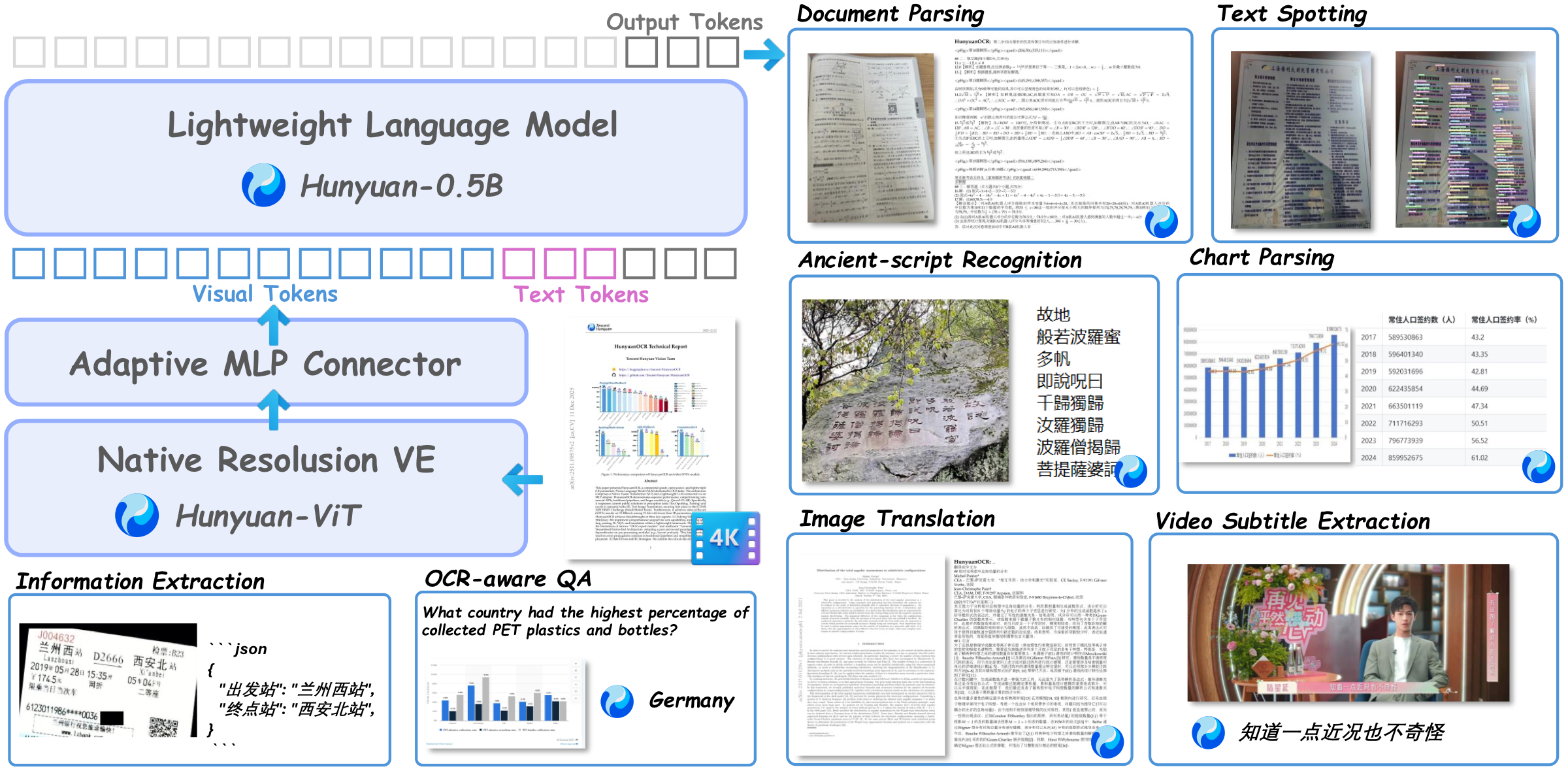
HunyuanOCR-1.5 is a lightweight, end-to-end OCR-specialized vision-language model. It targets a broad range of text-centric visual tasks and unifies document parsing, text spotting, information extraction, text-image translation within a single end-to-end VLM.
Building upon the validated lightweight architecture of HunyuanOCR-1.0, HunyuanOCR-1.5 does not redesign the model backbone. Instead, it performs a systematic upgrade around two goals — making the model faster and better:
llama.cpp with a GGUF-converted checkpoint and an OpenAI-compatible llama-server. A DFlash-adapted llama.cpp fork is provided as well, so the same speculative-decoding acceleration is available on PC.Together, HunyuanOCR-1.5 achieves both faster inference and broader OCR capability coverage while retaining the deployment advantages of a lightweight end-to-end model. The full SFT / DFlash training pipeline and the transformers / vLLM / llama.cpp inference stack are open-sourced in the GitHub repo.
Inference is split into three self-contained, mutually exclusive setups in the GitHub repo under inference/. vLLM (AR / DFlash) and native transformers inference require different, incompatible transformers versions and cannot share one environment — this is a validated constraint, not a preference:
| Setup | vLLM | DFlash accel. | transformers | CUDA | Best for |
|---|---|---|---|---|---|
inference/vllm_0_18_1 |
0.18.1 (release) | ❌ | ❌ | 12.x | simplest setup, AR only |
inference/nightly |
nightly | ✅ | ❌ | 13 | AR + DFlash acceleration |
inference/transformers |
— | — | ✅ 5.13.0 | host driver | native HF inference |
Each subfolder ships its own README and requirements.txt. See
inference/README.md
for the selection guide and the full rationale.
Common prerequisites: Python 3.10+ (3.12 tested), an NVIDIA GPU, and
huggingface_hub for downloading the weights:
pip install -U "huggingface_hub[cli]"
# target base (1.5) — skip the archived 1.0 to save space
huggingface-cli download tencent/HunyuanOCR --local-dir ./HunyuanOCR --exclude "v1.0/*"
The download contains both the base model and the dflash/ draft model.
All setups share the same weights and the same task-type prompts + sampling
(temperature=0.0, top_p=1.0, top_k=-1, repetition_penalty=1.08) +
post-processing, so their outputs are directly comparable. Grab the toolkit from
GitHub first:
git clone https://github.com/Tencent-Hunyuan/HunyuanOCR.git
cd HunyuanOCR
The model ships the official HunYuanVLForConditionalGeneration + AutoProcessor
integration (transformers ≥ 5.13.0). The simplest path — weights are pulled
from the Hub automatically:
import torch
from transformers import AutoProcessor, HunYuanVLForConditionalGeneration

MODEL_ID = "tencent/HunyuanOCR"

processor = AutoProcessor.from_pretrained(MODEL_ID, trust_remote_code=True)
model = HunYuanVLForConditionalGeneration.from_pretrained(
    MODEL_ID, torch_dtype=torch.bfloat16, device_map="auto",
    trust_remote_code=True,
).eval()

prompt = (
    "提取文档图片中正文的所有信息用markdown格式表示,其中页眉、页脚部分忽略,"
    "表格用html格式表达,文档中公式用latex格式表示,按照阅读顺序组织进行解析。"
)
messages = [{
    "role": "user",
    "content": [
        {"type": "image", "image": "/path/to/document.png"},
        {"type": "text",  "text":  prompt},
    ],
}]
inputs = processor.apply_chat_template(
    messages, add_generation_prompt=True, tokenize=True,
    return_dict=True, return_tensors="pt",
).to(model.device)
with torch.inference_mode():
    out = model.generate(**inputs, max_new_tokens=8000, do_sample=False)
gen = out[:, inputs["input_ids"].shape[1]:]
print(processor.batch_decode(gen, skip_special_tokens=True)[0])
For multi-GPU batch inference with sampling / early-stop / doc-parse
normalization strictly aligned to the vLLM client, use the shipped script in a
dedicated transformers==5.13.0 environment (see
inference/transformers/README.md):
# install per inference/transformers/requirements.txt, then:
python inference/transformers/infer_hf_8gpu_hyocr15.py \
    --model  ./HunyuanOCR \
    --input  /path/to/bench.jsonl \
    --output ./results/hf_out \
    --gpu-ids 0,1,2,3,4,5,6,7 \
    --max-new-tokens 8192 \
    --merge
Two mutually-exclusive vLLM setups. Both serve the model as tencent/HunyuanOCR
with -tp 1 and --max-model-len 131072.
B1 — vLLM 0.18.1 (release, AR only, simplest). The release build natively
supports HunYuanVLForConditionalGeneration; no nightly or patch required.
Install per
inference/vllm_0_18_1/requirements.txt
(core: pip install "vllm==0.18.1"), then:
MODEL_PATH=./HunyuanOCR GPU=0 PORT=8000 bash inference/vllm_0_18_1/serve.sh
curl -sf http://127.0.0.1:8000/v1/models     # readiness check
B2 — vLLM nightly (AR + DFlash speculative decoding). Required for the real
DFlash speedup. Install per
inference/nightly/requirements.txt:
uv pip install -U vllm --torch-backend=cu130 --extra-index-url https://wheels.vllm.ai/nightly
uv pip install runai-model-streamer
The DFlash draft lives under the dflash/ subfolder of tencent/HunyuanOCR.
vLLM's --speculative-config does not accept an HF subfolder, so download the
draft weight into a flat local dir first:
huggingface-cli download tencent/HunyuanOCR dflash/model.safetensors --local-dir ./HunyuanOCR
cp -r ./HunyuanOCR/dflash ./hyocr_dflash
Then launch AR or DFlash:
# AR (autoregressive) baseline
MODEL_PATH=./HunyuanOCR GPU=0 PORT=8000 bash inference/nightly/serve_ar.sh

# DFlash speculative decoding
MODEL_PATH=./HunyuanOCR DFLASH_PATH=./hyocr_dflash \
GPU=0 PORT=8001 NUM_SPEC_TOKENS=15 bash inference/nightly/serve_dflash.sh
Client (either vLLM setup). Send one image with the shipped client. The
prompt is locked to an official task type via --task-type (run --list-tasks
to see all); sampling and streaming tail-repetition early-stop / cleanup are
built in:
# use the client from the same setup folder, e.g. inference/vllm_0_18_1/ or inference/nightly/
python inference/vllm_0_18_1/infer_vllm_client.py \
    --host 127.0.0.1 --port 8000 \
    --model tencent/HunyuanOCR \
    --image /path/to/document.png \
    --task-type doc_parse \
    --max-tokens 32768
# add --no-stream to disable streaming + early-stop
# add --no-doc-postprocess to disable doc_parse markdown normalization
Available task types (--task-type): doc_parse (default), structured_parse, spotting_json, spotting_hunyuan, layout, layout_parse, chart_parse, formula, table, doc_trans_en2zh, trans_other2en, trans_other2zh.
For batch inference over a directory (same task types, multi-endpoint concurrency, resumable):
python inference/vllm_0_18_1/batch_infer.py \
    --image-dir /path/to/images \
    --out-dir /path/to/output \
    --ports 8000 \
    --task-type doc_parse \
    --max-tokens 32768 \
    --concurrency 16
Or hand-written with the OpenAI SDK:
import base64
from openai import OpenAI

def data_url(p):  # Mime is fixed to image/jpeg
    return f"data:image/jpeg;base64,{base64.b64encode(open(p,'rb').read()).decode()}"

client = OpenAI(api_key="EMPTY", base_url="http://127.0.0.1:8000/v1")
resp = client.chat.completions.create(
    model="tencent/HunyuanOCR",
    messages=[
        {"role": "system", "content": ""},
        {"role": "user", "content": [
            {"type": "image_url", "image_url": {"url": data_url("/path/to/document.png")}},
            {"type": "text", "text": "请提取图片中的文字内容。"},
        ]},
    ],
    max_tokens=32768,
    temperature=0.0, top_p=1.0,
    extra_body={"top_k": -1, "repetition_penalty": 1.08, "skip_special_tokens": True},
)
print(resp.choices[0].message.content)
For CPU / consumer-GPU / laptop environments, HunyuanOCR-1.5 can also be deployed through llama.cpp after converting the checkpoint to GGUF. Both the community llama.cpp (HunyuanOCR base only) and a DFlash-adapted fork (wendadawen/llama.cpp @ dflash-adapt-hunyuanocr-hunyuanstyle) are supported.
Minimal build & serve (community, no DFlash):
# 1. Build
git clone https://github.com/ggml-org/llama.cpp.git && cd llama.cpp
cmake -B build -DLLAMA_BUILD_EXAMPLES=ON   # add -DGGML_CUDA=ON for NVIDIA GPU
cmake --build ./build --config Release -j

# 2. Convert HunyuanOCR to GGUF (base + mmproj)
hf download tencent/HunyuanOCR --local-dir ./HunyuanOCR --exclude "v1.0/*"
python3 convert_hf_to_gguf.py --outfile ./HunyuanOCR/hyocr-f16.gguf --outtype f16 ./HunyuanOCR
python3 convert_hf_to_gguf.py --outfile ./HunyuanOCR/mmproj-hyocr-f16.gguf --outtype f16 --mmproj ./HunyuanOCR

# 3. Serve (OpenAI-compatible)
build/bin/llama-server \
  --model ./HunyuanOCR/hyocr-f16.gguf \
  --mmproj ./HunyuanOCR/mmproj-hyocr-f16.gguf \
  --host 0.0.0.0 --port 8080 --alias HYVL \
  --ctx-size 10240 --n-predict 4096
The DFlash-adapted variant and the full guide are in docs/llama_cpp.md in the GitHub repo.
提取文档图片中正文的所有信息用markdown格式表示,其中页眉、页脚部分忽略,表格用html格式表达,文档中公式用latex格式表示,按照阅读顺序组织进行解析。
The model also handles text spotting, information extraction, and text-image translation — pass a task-specific instruction as the text prompt (or use --task-type with the shipped client).
tencent/HunyuanOCR/dflashv1.0/): tencent/HunyuanOCR/v1.0We would like to thank Qwen and DFlash for their valuable models and ideas.
Special thanks to the Hugging Face community for their Day-0 support.
HunyuanOCR-1.5 is released under the same license as HunyuanOCR 1.0 — the Tencent Hunyuan Community License Agreement. See LICENSE for the full terms.
