
Hub Python Library documentation
推理端点
推理端点
Inference Endpoints 提供了一种安全的生产级解决方案,可轻松将任何 transformers、sentence-transformers 和 diffusers 模型部署到由 Hugging Face 管理的专用且支持自动扩缩容的基础设施上。Inference Endpoint 基于 Hub 上的模型构建。
在本指南中,我们将学习如何使用 huggingface_hub 以编程方式管理 Inference Endpoints。有关 Inference Endpoints 产品本身的更多信息,请参阅其官方文档。
本指南假设 huggingface_hub 已正确安装,且您的机器已登录。如果尚未满足这些条件,请参阅 快速入门指南。支持 Inference Endpoints API 的最低版本为 v0.19.0。
新增:现在可以通过简单的 API 调用,从 HF 模型目录部署推理端点。该目录是一份经过精心整理的模型列表,这些模型可以以优化后的配置进行部署。您无需进行任何配置,所有繁重的工作都由我们承担!所有模型和配置均经过测试,以确保提供最佳的成本/性能平衡。create_inference_endpoint_from_catalog() 的工作方式与 create_inference_endpoint() 相同,但需要传递的参数少得多。您可以使用 list_inference_catalog() 以编程方式获取该目录。
请注意,这仍然是一个实验性功能。如果您使用了它,请告诉我们您的想法!
每个目录模型都通过一个配方进行部署:即针对该模型经过测试的硬件与引擎组合。list_inference_catalog() 返回模型及其配方,并支持服务端过滤器(accelerator、engine、license、task、search、limit):
>>> from huggingface_hub import list_inference_catalog
>>> catalog = list_inference_catalog(task="text-generation", accelerator="neuron")
>>> catalog[0]
InferenceCatalogModel(repo_id='meta-llama/Llama-3.1-8B-Instruct', name='Llama-3.1-8B-Instruct', ...)
>>> catalog[0].recipes
[InferenceCatalogRecipe(id='sizzling-biryani-g4xsi1ac', accelerator='gpu', engine='vllm', gguf_file=None, revision=None),
 InferenceCatalogRecipe(id='artisanal-quinoa-yz9ynamx', accelerator='neuron', engine='vllmNeuron', gguf_file=None, revision=None)]
将 repo_id 传递给 create_inference_endpoint_from_catalog() 以部署模型的默认配方,可选地通过 accelerator("cpu"、"gpu" 或 "neuron")和 gguf_file 进行细化,或者传递 recipe_id 以部署确切的配方:
>>> from huggingface_hub import create_inference_endpoint_from_catalog
>>> endpoint = create_inference_endpoint_from_catalog(repo_id="openai/gpt-oss-120b")
>>> endpoint = create_inference_endpoint_from_catalog(recipe_id="artisanal-quinoa-yz9ynamx")
查找用于部署的硬件
create_inference_endpoint() 接受的 accelerator、vendor、region、instance_type 和 instance_size 值之间存在相互依赖关系。使用 list_inference_endpoints_hardware() 可以列出有效的组合,以及每小时的单价和您命名空间的加速器配额:
>>> from huggingface_hub import list_inference_endpoints_hardware

>>> for hw in list_inference_endpoints_hardware():
...     if hw.accelerator == "gpu" and hw.status == "available":
...         print(hw.vendor, hw.region, hw.instance_type, hw.instance_size, hw.price_per_hour)
aws us-east-1 nvidia-l4 x1 0.8
aws us-east-1 nvidia-l4 x4 3.8
...
配额是按命名空间划分的,因此请传入您将要部署到的 namespace(默认为您自己的账户):
>>> list_inference_endpoints_hardware(namespace="my-org")或通过 CLI:
hf endpoints hardware --accelerator gpu
创建推理端点
第一步是使用 create_inference_endpoint() 创建一个推理端点:
>>> from huggingface_hub import create_inference_endpoint

>>> endpoint = create_inference_endpoint(
...     "my-endpoint-name",
...     repository="gpt2",
...     framework="pytorch",
...     task="text-generation",
...     accelerator="cpu",
...     vendor="aws",
...     region="us-east-1",
...     type="authenticated",
...     instance_size="x2",
...     instance_type="intel-icl"
... )
或通过 CLI:
hf endpoints deploy my-endpoint-name --repo gpt2 --framework pytorch --accelerator cpu --vendor aws --region us-east-1 --instance-size x2 --instance-type intel-icl --task text-generation

# Deploy from the catalog with a single command
hf endpoints catalog deploy --repo openai/gpt-oss-120b

# Deploy from the catalog with a specific accelerator
hf endpoints catalog deploy --repo openai/gpt-oss-120b --accelerator gpu

# Deploy an exact catalog recipe, as listed by 'hf endpoints catalog ls'
hf endpoints catalog deploy --recipe artisanal-quinoa-yz9ynamx
在此示例中,我们创建了一个名为 "my-endpoint-name" 的 authenticated Inference Endpoint,用于为 gpt2 提供 text-generation 服务。authenticated Inference Endpoint 表示访问该 API 需要提供您的令牌。此外,我们还需要提供额外信息来配置硬件要求,例如供应商、区域、加速器、实例类型和大小。您可以在此处查看可用资源列表。或者,为了操作方便,您可以使用 Web 界面 手动创建 Inference Endpoint。有关高级设置及其用法的详细信息,请参阅此指南。
create_inference_endpoint() 返回的值为一个 InferenceEndpoint 对象:
>>> endpoint
InferenceEndpoint(name='my-endpoint-name', namespace='Wauplin', repository='gpt2', status='pending', url=None)
或通过 CLI:
hf endpoints describe my-endpoint-name
这是一个 dataclass,用于保存有关端点的信息。您可以访问诸如 name、repository、status、task、created_at、updated_at 等重要属性。如有需要,您还可以通过 endpoint.raw 访问来自服务器的原始响应。
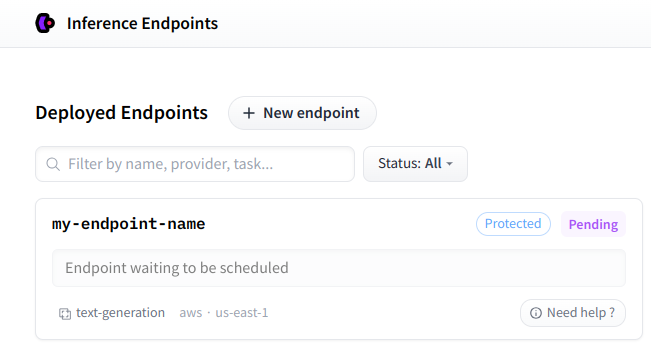
创建 Inference Endpoint 后,您可以在您的个人仪表板上找到它。
使用自定义图像
默认情况下,Inference Endpoint 由 Hugging Face 提供的 docker 镜像构建。不过,可以使用 custom_image 参数指定任意 docker 镜像。一个常见的用例是使用 text-generation-inference 框架来运行 LLM。可以这样操作:
# Start an Inference Endpoint running Zephyr-7b-beta on TGI
>>> from huggingface_hub import create_inference_endpoint
>>> endpoint = create_inference_endpoint(
...     "aws-zephyr-7b-beta-0486",
...     repository="HuggingFaceH4/zephyr-7b-beta",
...     framework="pytorch",
...     task="text-generation",
...     accelerator="gpu",
...     vendor="aws",
...     region="us-east-1",
...     type="authenticated",
...     instance_size="x1",
...     instance_type="nvidia-a10g",
...     custom_image={
...         "healthRoute": "/health",
...         "env": {
...             "MAX_BATCH_PREFILL_TOKENS": "2048",
...             "MAX_INPUT_LENGTH": "1024",
...             "MAX_TOTAL_TOKENS": "1512",
...             "MODEL_ID": "/repository"
...         },
...         "url": "ghcr.io/huggingface/text-generation-inference:1.1.0",
...     },
... )
作为 custom_image 传入的值是一个字典,其中包含指向 docker 容器的 url 以及运行该容器的配置。有关更多详细信息,请参阅 Swagger 文档。
对于托管在私有容器注册表中的镜像,请传入 container_registry_username,并在注册表要求时传入 container_registry_password。这些凭据仅支持纯自定义容器:
>>> endpoint = create_inference_endpoint(
...     # Other endpoint and hardware arguments omitted for brevity.
...     custom_image={"url": "private.registry.example/my-image:latest", "port": 8080},
...     container_registry_username="user",
...     container_registry_password="password",
... )
等效的 CLI 选项为 --container-registry-username 和 --container-registry-password:
hf endpoints deploy my-endpoint ... --custom-image private.registry.example/my-image:latest \
  --container-registry-username user --container-registry-password password
custom_image 还接受 API 支持的引擎特定容器类型,方法是以引擎名称(vLLM、vLLMNeuron、sGLang、tgi、tgiNeuron、tei、llamacpp、hfServe、……)作为字典的键,而不是保持扁平结构。每个引擎都包含常规的容器字段(url、port、healthRoute)以及其自身的调优选项。任何顶层不包含 url 的字典都会原样转发给 API,因此后续添加到 API 中的引擎无需升级 huggingface_hub 即可正常工作:
# Start an Inference Endpoint running the vLLM engine image
>>> endpoint = create_inference_endpoint(
...     "llama-3-1-8b-instruct-vllm",
...     repository="meta-llama/Llama-3.1-8B-Instruct",
...     framework="pytorch",
...     task="text-generation",
...     accelerator="gpu",
...     vendor="aws",
...     region="us-east-1",
...     instance_size="x1",
...     instance_type="nvidia-l4",
...     custom_image={
...         "vLLM": {
...             "url": "vllm/vllm-openai:v0.23.0",
...             "healthRoute": "/health",
...             "port": 8000,
...             "tensorParallelSize": 1,
...         }
...     },
... )
如果没有引擎键,相同的字典将作为普通的自定义容器发送,因此引擎特定的选项(此处为 tensorParallelSize)会被丢弃。
对于需要自定义入口点或运行时标志的容器,请传入 container_command 和/或 container_args(每个均为令牌列表)。它们对应于 API 负载中的 model.command 和 model.args。它们并不局限于自定义镜像:托管引擎镜像(例如 vLLM、SGLang)同样可以通过 container_args 接受引擎标志。通过 CLI 也可以使用相同的功能:hf endpoints deploy ... --container-command "..." --container-args "..."。
多加速器实例上的并行
vLLM 和 SGLang 默认使用一个加速器,而端点会分配其实例中的所有加速器,因此如果不设置并行度,模型将只加载到一个加速器上,其余加速器处于空闲状态,同时系统仍会报告健康状态,这意味着你为所有加速器付费,却只获得单个加速器的吞吐量。这就是为什么 API 现在会拒绝此类部署。(TGI 从实例推导分片数量,不受此影响。)将 tensorParallelSize 设置为将一份模型副本分片到各个加速器上,或者将 dataParallelSize(仅限 vLLM)设置为在每个加速器上运行一份副本:
>>> endpoint = create_inference_endpoint(
...     "gpt-oss-120b-vllm",
...     repository="openai/gpt-oss-120b",
...     framework="custom",
...     accelerator="gpu",
...     instance_size="x8",
...     instance_type="nvidia-h200",
...     region="us-east-1",
...     vendor="aws",
...     custom_image={"vLLM": {"url": "vllm/vllm-openai:v0.23.0", "tensorParallelSize": 8}},
... )
在 CLI 中,--engine 用于选择托管引擎镜像,并且这两个标志会被写入其配置中:
hf endpoints deploy gpt-oss-120b-vllm --repo openai/gpt-oss-120b --framework custom \
  --accelerator gpu --instance-size x8 --instance-type nvidia-h200 --region us-east-1 --vendor aws \
  --engine vllm --custom-image vllm/vllm-openai:v0.23.0 --tensor-parallel-size 8
若要重新调整已部署的端点,请单独将 tensor_parallel_size 传递给 update() 或 hf endpoints update。model.image 作为整体发送,需要 url,因此会获取端点当前的镜像并就地更新:
>>> endpoint.update(tensor_parallel_size=4)container_args(--tp 8)并不等效:它作为命令行标志传入引擎,而非 API 用于对照实例加速器数量进行校验的 model.image 配置。请将其用于没有 image 字段的引擎标志,以及没有并行度字段的普通自定义容器。
获取或列出现有的 Inference Endpoints
在某些情况下,您可能需要管理之前创建的 Inference Endpoints。如果您知道其名称,可以使用 get_inference_endpoint() 获取它,该方法会返回一个 InferenceEndpoint 对象。或者,您可以使用 list_inference_endpoints() 获取所有 Inference Endpoints 的列表。这两种方法都接受一个可选的 namespace 参数。您可以将 namespace 设置为任何您所属的组织。否则,它将默认为您的用户名。
>>> from huggingface_hub import get_inference_endpoint, list_inference_endpoints

# Get one
>>> get_inference_endpoint("my-endpoint-name")
InferenceEndpoint(name='my-endpoint-name', namespace='Wauplin', repository='gpt2', status='pending', url=None)

# List all endpoints from an organization
>>> list_inference_endpoints(namespace="huggingface")
[InferenceEndpoint(name='aws-starchat-beta', namespace='huggingface', repository='HuggingFaceH4/starchat-beta', status='paused', url=None), ...]

# List all endpoints from all organizations the user belongs to
>>> list_inference_endpoints(namespace="*")
[InferenceEndpoint(name='aws-starchat-beta', namespace='huggingface', repository='HuggingFaceH4/starchat-beta', status='paused', url=None), ...]
或通过 CLI:
hf endpoints describe my-endpoint-name
hf endpoints ls --namespace huggingface
hf endpoints ls --namespace '*'
检查部署状态
在本指南的其余部分中,我们将假设有一个名为 endpoint 的 InferenceEndpoint 对象。您可能已经注意到,该端点具有类型为 InferenceEndpointStatus 的 status 属性。当推理端点部署完成并可访问时,状态应为 "running",并且 url 属性会被设置:
>>> endpoint
InferenceEndpoint(name='my-endpoint-name', namespace='Wauplin', repository='gpt2', status='running', url='https://jpj7k2q4j805b727.us-east-1.aws.endpoints.huggingface.cloud')
在达到 "running" 状态之前,Inference Endpoint 通常会经历 "initializing" 或 "pending" 阶段。您可以通过运行 fetch() 来获取端点的新状态。与 InferenceEndpoint 中所有向服务器发起请求的方法一样,endpoint 的内部属性会被就地修改:
>>> endpoint.fetch()
InferenceEndpoint(name='my-endpoint-name', namespace='Wauplin', repository='gpt2', status='pending', url=None)
或通过 CLI:
hf endpoints describe my-endpoint-name
与其在等待 Inference Endpoint 运行期间反复获取其状态,不如直接调用 wait()。该辅助函数接受 timeout 和 fetch_every 参数(以秒为单位),并会阻塞线程,直到 Inference Endpoint 部署完成。默认值分别为 None(无超时)和 5 秒。
# Pending endpoint
>>> endpoint
InferenceEndpoint(name='my-endpoint-name', namespace='Wauplin', repository='gpt2', status='pending', url=None)

# Wait 10s => raises a InferenceEndpointTimeoutError
>>> endpoint.wait(timeout=10)
    raise InferenceEndpointTimeoutError("Timeout while waiting for Inference Endpoint to be deployed.")
huggingface_hub._inference_endpoints.InferenceEndpointTimeoutError: Timeout while waiting for Inference Endpoint to be deployed.

# Wait more
>>> endpoint.wait()
InferenceEndpoint(name='my-endpoint-name', namespace='Wauplin', repository='gpt2', status='running', url='https://jpj7k2q4j805b727.us-east-1.aws.endpoints.huggingface.cloud')
如果设置了 timeout 且 Inference Endpoint 加载耗时过长,则会引发 InferenceEndpointTimeoutError 超时错误。
运行推理
当您的 Inference Endpoint 启动并运行后,您就可以在其上执行推理了!
InferenceEndpoint 具有两个属性 client 和 async_client,分别返回一个 InferenceClient 和一个 AsyncInferenceClient 对象。
# Run text_generation task:
>>> endpoint.client.text_generation("I am")
' not a fan of the idea of a "big-budget" movie. I think it\'s a'

# Or in an asyncio context:
>>> await endpoint.async_client.text_generation("I am")
如果推理端点未运行,则会引发 InferenceEndpointError 异常:
>>> endpoint.client
huggingface_hub._inference_endpoints.InferenceEndpointError: Cannot create a client for this Inference Endpoint as it is not yet deployed. Please wait for the Inference Endpoint to be deployed using `endpoint.wait()` and try again.
有关如何使用 InferenceClient 的更多详细信息,请参阅 Inference guide。
管理生命周期
现在我们已经了解了如何创建推理端点并在其上运行推理,接下来看看如何管理其生命周期。
在本节中,我们将介绍诸如 pause()、resume()、scale_to_zero()、update() 和 delete() 等方法。这些方法都是为了方便起见而添加到 InferenceEndpoint 中的别名。如果您愿意,也可以使用在
HfApi中定义的通用方法:pause_inference_endpoint()、resume_inference_endpoint()、scale_to_zero_inference_endpoint()、update_inference_endpoint() 以及 delete_inference_endpoint()。
暂停或缩容至零
To reduce costs when your Inference Endpoint is not in use, you can choose to either pause it using pause() or scale it to zero using scale_to_zero().
处于暂停或缩容至零状态的推理端点不会产生任何费用。这两者的区别在于,暂停的端点需要通过resume()显式地恢复。相反,缩容至零的端点在收到推理调用时会自动启动,但会产生额外的冷启动延迟。此外,还可以配置推理端点,使其在一段时间不活动后自动缩容至零。
# Pause and resume endpoint
>>> endpoint.pause()
InferenceEndpoint(name='my-endpoint-name', namespace='Wauplin', repository='gpt2', status='paused', url=None)
>>> endpoint.resume()
InferenceEndpoint(name='my-endpoint-name', namespace='Wauplin', repository='gpt2', status='pending', url=None)
>>> endpoint.wait().client.text_generation(...)
...

# Scale to zero
>>> endpoint.scale_to_zero()
InferenceEndpoint(name='my-endpoint-name', namespace='Wauplin', repository='gpt2', status='scaledToZero', url='https://jpj7k2q4j805b727.us-east-1.aws.endpoints.huggingface.cloud')
# Endpoint is not 'running' but still has a URL and will restart on first call.
或通过 CLI:
hf endpoints pause my-endpoint-name
hf endpoints resume my-endpoint-name
hf endpoints scale-to-zero my-endpoint-name
更新模型或硬件要求
在某些情况下,您可能希望在不创建新端点的情况下更新您的 Inference Endpoint。您可以更新托管的模型或运行该模型所需的硬件配置。您可以使用 update() 来实现:
# Change target model
>>> endpoint.update(repository="gpt2-large")
InferenceEndpoint(name='my-endpoint-name', namespace='Wauplin', repository='gpt2-large', status='pending', url=None)

# Update number of replicas
>>> endpoint.update(min_replica=2, max_replica=6)
InferenceEndpoint(name='my-endpoint-name', namespace='Wauplin', repository='gpt2-large', status='pending', url=None)

# Update to larger instance
>>> endpoint.update(accelerator="cpu", instance_size="x4", instance_type="intel-icl")
InferenceEndpoint(name='my-endpoint-name', namespace='Wauplin', repository='gpt2-large', status='pending', url=None)

# Update the container arguments, e.g. engine flags on an endpoint running vLLM or SGLang.
# Replaces the current value, it is not appended.
>>> endpoint.update(container_args=["--enable-auto-tool-choice", "--tool-call-parser", "lfm2"])
InferenceEndpoint(name='my-endpoint-name', namespace='Wauplin', repository='gpt2-large', status='pending', url=None)
或通过 CLI:
hf endpoints update my-endpoint-name --repo gpt2-large
hf endpoints update my-endpoint-name --min-replica 2 --max-replica 6
hf endpoints update my-endpoint-name --accelerator cpu --instance-size x4 --instance-type intel-icl
hf endpoints update my-endpoint-name --container-args "--enable-auto-tool-choice --tool-call-parser lfm2"
# Merged into the image currently configured on the endpoint.
hf endpoints update my-endpoint-name --tensor-parallel-size 8
# Or replace the image entirely, in which case pass back the settings you want to keep.
hf endpoints update my-endpoint-name --engine vllm --custom-image vllm/vllm-openai:v0.23.0 --port 8000
删除端点
最后,如果您不再使用 Inference Endpoint,可以直接调用 ~InferenceEndpoint.delete()。
这是一个不可撤销的操作,将完全删除该端点,包括其配置、日志和使用指标。您无法恢复已删除的 Inference Endpoint。
端到端示例
Inference Endpoints 的一个典型用例是批量处理作业,以限制基础设施成本。您可以使用本指南中介绍的方法来自动化此流程:
>>> import asyncio
>>> from huggingface_hub import create_inference_endpoint

# Start endpoint + wait until initialized
>>> endpoint = create_inference_endpoint(name="batch-endpoint",...).wait()

# Run inference
>>> client = endpoint.client
>>> results = [client.text_generation(...) for job in jobs]

# Or with asyncio
>>> async_client = endpoint.async_client
>>> results = await asyncio.gather(*[async_client.text_generation(...) for job in jobs])

# Pause endpoint
>>> endpoint.pause()
或者,如果您的推理端点已经存在且处于暂停状态:
>>> import asyncio
>>> from huggingface_hub import get_inference_endpoint

# Get endpoint + wait until initialized
>>> endpoint = get_inference_endpoint("batch-endpoint").resume().wait()

# Run inference
>>> async_client = endpoint.async_client
>>> results = await asyncio.gather(*[async_client.text_generation(...) for job in jobs])

# Pause endpoint
>>> endpoint.pause()